
Introduction
Every internet-facing server eventually attracts attention.
A newly deployed website, API, or application does not need to be famous to be scanned. Within hours of becoming publicly accessible, automated systems begin testing it for weaknesses.
These requests are not necessarily targeted attacks. Most are automated reconnaissance attempts searching for common mistakes: exposed credentials, outdated software, forgotten administrative panels, and publicly accessible development files.
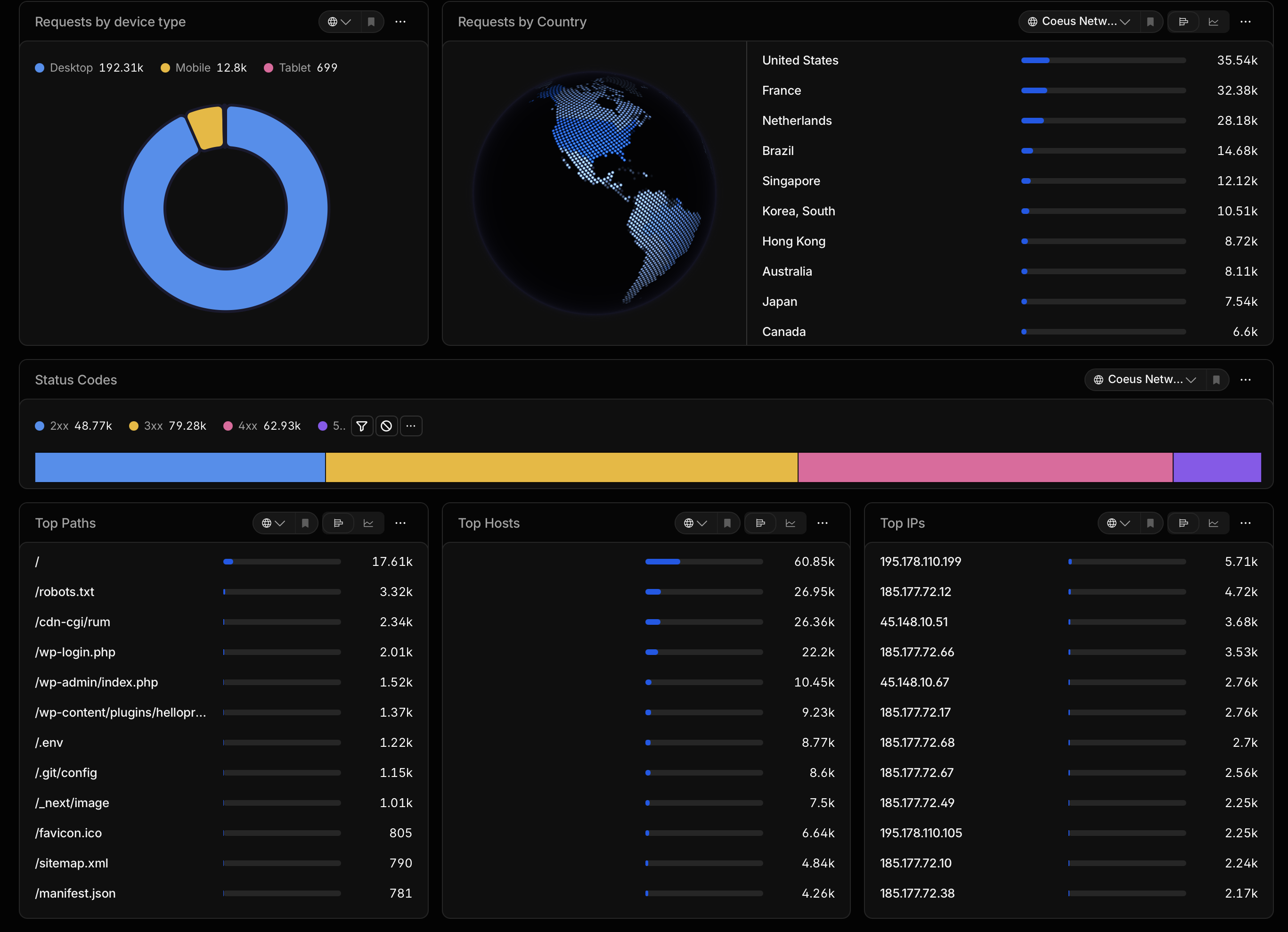
A review of 30 days of web server requests reveals a familiar pattern: continuous automated discovery activity targeting common vulnerabilities across modern web infrastructure.
What Are These Requests Looking For?
The majority of suspicious requests fall into several categories:
- Content management system discovery
- Credential and secret harvesting
- Source code exposure
- Cloud configuration discovery
- Debug endpoint identification
- Known vulnerability checks
The goal is simple:
Find a system where a developer accidentally exposed something valuable.
Attackers and automated scanners do not need to understand an entire application. They only need one mistake.
1. WordPress Scanners Are Everywhere
Among the most common requests were attempts to locate WordPress installations:
          /wp-login.php
          /wp-admin/index.php
          /wp-content/plugins/hellopress/wp_filemanager.php
          /xmlrpc.php
These requests are extremely common across the internet.
WordPress powers a large number of websites, and historically vulnerable plugins and outdated installations have created opportunities for attackers.
The presence of these requests does not mean a server is running WordPress. It means automated scanners are asking:
"Is this a WordPress site, and does it contain a known weakness?"
2. The Search for Secrets
One of the most important categories observed was environment file discovery:
          /.env
          /ADMIN/.env
          /apps/.env
          /clients/.env
          /.env.gcp
          /.env.analytics
          /.env.sendgrid.old
Environment files often contain sensitive configuration:
- Database passwords
- API keys
- Cloud credentials
- Email service credentials
- Authentication secrets
A single exposed environment file can turn a small configuration mistake into a major security incident.
If a file contains credentials, it should never be publicly accessible.
3. Source Code Discovery Through Git
Another repeated pattern was Git repository probing:
          /.git/config
          /.git/HEAD
          /.git/description
A forgotten Git directory can expose:
- Application source code
- Previous commits
- Removed secrets
- Internal infrastructure details
- Developer information
Attackers often search Git repositories because sensitive information removed from the current application may still exist in version history.
4. Cloud Infrastructure Is Becoming a Target
Modern applications increasingly rely on cloud services, containers, and infrastructure-as-code.
The scans reflected this trend:
          /template.yaml
          /aws.env.json
          /.terraform
          /docker-compose.yml
          /.docker/config.json
These files may reveal:
- Cloud architecture
- Deployment information
- Storage configuration
- Container credentials
As organizations move toward cloud environments, attackers have adapted their discovery techniques.
5. Debug Files and Development Artifacts
Several requests targeted files associated with testing and debugging:
          /phpinfo.php
          /include/phpinfo.php
          /_test.php
          /admin/php-info.php
Debug information can reveal:
- Server versions
- Installed modules
- Configuration details
- Environment information
A debugging tool that helps developers can become valuable intelligence for attackers.
6. Framework Fingerprinting
Modern applications also attract technology-specific probes:
          /_next/image
          /next.config.js
          /src/config/constants.js
          /src/utils/mailer.ts
These requests attempt to identify:
- Frameworks
- Application structure
- Development patterns
Are These Signs of a Breach?
Not necessarily.
The presence of scanning activity alone does not indicate compromise. Public servers continuously receive automated traffic from scanners, crawlers, security tools, and malicious bots.
The important question is:
Did any suspicious request succeed?
Example:
          GET /.env
          404 Not Found
Lower concern.
          GET /.env
          200 OK
Higher concern because sensitive data may have been exposed.
Building Resilience Against Automated Scanning
1. Block Sensitive Files
          .env
          .git
          docker-compose.yml
          terraform files
          configuration backups
2. Disable Unused Components
If a system does not use PHP, WordPress, or legacy applications, those paths should not exist.
3. Monitor Behavior Changes
          Reconnaissance
                ↓
          Discovery
                ↓
          Successful Access
                ↓
          Exploitation
Conclusion
The modern internet is a constant environment of automated discovery.
A server does not need to be famous to receive thousands of suspicious requests. Automated systems continuously search for exposed files, outdated software, and configuration mistakes.
The goal of cybersecurity is not preventing every scanner from reaching a server. That is impossible.
The goal is ensuring that when someone knocks, the doors are locked, the alarms work, and defenders understand the difference between background noise and a real intrusion attempt.