
What to Expect When Monitoring Infrastructure: Separating Traffic, Scans, and Security Events
Introduction
Deploying a web server and API is only the beginning of operating an internet-facing system. Once a service is available, the next challenge is understanding everything interacting with it.
Infrastructure monitoring is not simply collecting logs. It is the process of turning millions of requests, responses, and behaviors into meaningful information.
A production system receives a mixture of:
- Real users
- Search engines
- Automated scanners
- Security researchers
- API clients
- Malicious automation
- Broken or outdated clients
The challenge is determining the difference between normal activity, expected security scanning, and events that require investigation.
From Visibility to Understanding
The first step in infrastructure security is visibility.
Without visibility, operators cannot answer:
- Who is accessing the system?
- What applications are being targeted?
- Which requests are successful?
- What behavior is unusual?
- When should someone respond?
Raw logs provide events. Monitoring provides context.
A request is data. A pattern is intelligence.
1. Understanding User Agents: Who Is Talking to Your System?
User agents provide clues about the software making requests.
Observed user agents included:
          curl/8.7.1
          TLM-Audit-Scanner/1.0
          Mozilla/5.0 Safari
          Mozilla/5.0 Chrome
          Mozilla/5.0 Firefox
These represent different types of activity.
Curl
Command-line clients such as curl are commonly used by:
- Developers testing APIs
- Automation scripts
- Security scanners
- Infrastructure tools
Named Security Scanners
Identifiable scanners such as:
TLM-Audit-Scanner/1.0
demonstrate why attribution matters. Not every scan is an attack. Some are security assessment tools mapping exposed systems.
Browser Traffic
Chrome, Safari, Firefox, and mobile browsers represent normal human interaction and automated browser activity.
2. Cache Behavior Reveals Application Characteristics
Cache status provides insight into how requests are processed.
          None
          109.31k

          Dynamic
          83.46k

          Hit
          5.91k

          Miss
          2.59k

          Expired
          1.45k

          Bypass
          1.44k

          Revalidated
          1.39k
These statuses help operators understand:
- Which content is served dynamically
- Which resources are cached
- Where performance improvements are possible
- Whether requests are reaching application servers
Monitoring is not only about security. It also improves reliability and performance.
3. Response Codes Tell the Story
HTTP response codes provide important security and operational signals.
          200 OK                 39.17k
          404 Not Found          28.89k
          304 Not Modified        2.06k
          410 Gone                1.73k
          405 Method Not Allowed  1.72k
          307 Temporary Redirect    828
          301 Moved Permanently    679
          308 Permanent Redirect   536
          500 Internal Error       340
          400 Bad Request          150
          403 Forbidden             96
Successful Requests
Successful responses indicate normal application usage but should still be evaluated in context.
404 Responses
A significant number of 404 responses can represent:
- Broken links
- Outdated bookmarks
- Scanner discovery attempts
- Automated probing
500 Errors
Internal errors require attention because they may indicate:
- Application bugs
- Dependency failures
- Unexpected input handling
4. Protocol Analysis: Understanding How Systems Connect
Modern infrastructure supports multiple HTTP versions:
          HTTP/1.1   152.26k
          HTTP/2      46.11k
          HTTP/3       7.05k
          HTTP/1.0       119
This information helps operators understand:
- Client compatibility
- Performance characteristics
- Modern protocol adoption
5. IP Addresses and Reputation Context
Monitoring source IP addresses can reveal repeated behavior patterns.
A single request may be harmless. Thousands of repeated requests from related sources may indicate:
- Automated scanning
- Bot activity
- Credential probing
- Security research activity
IP addresses alone are not enough. They require additional context:
- Request patterns
- Endpoints accessed
- Authentication attempts
- Response results
6. Not Every Scan Is an Attack: Understanding Security Research Activity
Infrastructure monitoring creates an important distinction between malicious traffic and legitimate security scanning.
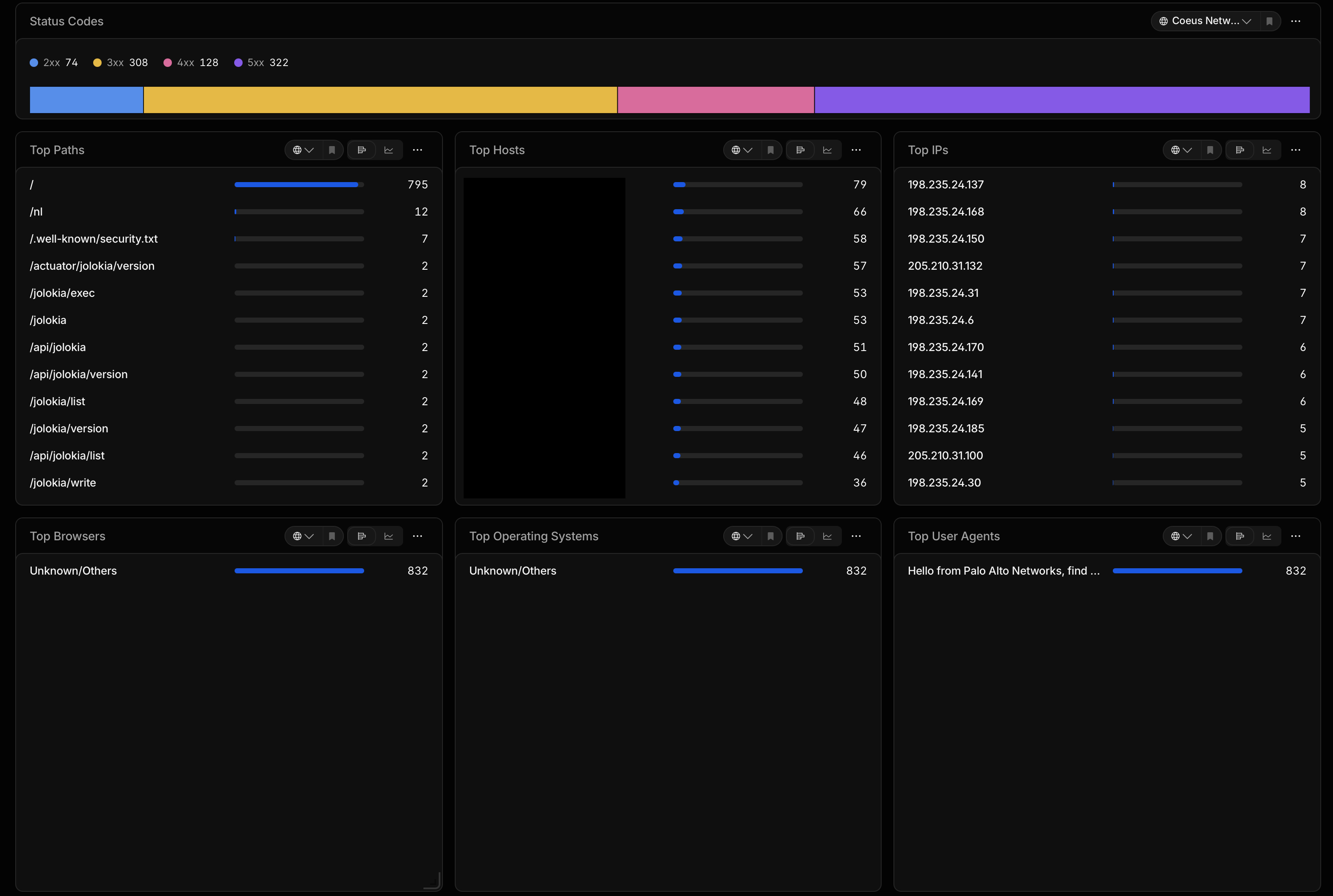
During monitoring, some requests may identify themselves as security assessment activity rather than anonymous probing.
          Hello from Palo Alto Networks,
          find out more about our scans in
          Cortex Xpanse Scanning Activity
This type of activity is associated with Palo Alto Networks Cortex Xpanse, an attack surface management platform designed to discover and monitor internet-facing assets.
Security scanning platforms help organizations understand their external attack surface by identifying exposed services and technologies.
Example Requests
          /

          /.well-known/security.txt

          /actuator/jolokia/version

          /jolokia

          /api/jolokia

          /jolokia/list

          /jolokia/write
These requests demonstrate service discovery. The scanner is checking whether specific technologies or management interfaces are publicly exposed.
The important question is not:
"Was the system scanned?"
Public systems are constantly scanned. The important questions are:
- Who performed the scan?
- What were they looking for?
- Was anything exposed?
- Did the behavior escalate?
7. Why Monitoring Requires Intelligence
A basic security system might create an alert for every unusual request.
          Unknown request
                  ↓
          Critical Alert
This quickly creates alert fatigue.
A mature monitoring system creates context:
          Source Identity
                  +
          Behavior
                  +
          History
                  +
          Target
                  +
          Result
                  =
          Risk Assessment
The difference between a scanner and an incident is often determined by context.
The Evolution of Infrastructure Security
Infrastructure maturity develops through several stages:
          Stage 1:
          "I have a server."

          Stage 2:
          "I can see requests."

          Stage 3:
          "I understand patterns."

          Stage 4:
          "I detect threats."

          Stage 5:
          "I respond automatically."
Monitoring is the bridge between deployment and autonomous security operations.
Conclusion
Operating an internet-facing system means accepting that traffic will always arrive. The goal is not to eliminate every request, scanner, or unknown visitor.
The goal is understanding what is happening well enough to make intelligent decisions.
Web servers teach us that exposure creates discovery. APIs teach us that services create attack surfaces. Infrastructure monitoring teaches us that data must become understanding.
The future of security is not simply blocking more traffic. It is building systems capable of recognizing behavior, prioritizing risk, and responding with precision.